
Introducing the Redesigned TrustedParts.com BOM Tool
Published: January 19, 2026

Introducing the Redesigned TrustedParts.com BOM Tool
TrustedParts.com is excited to announce a new BOM tool. Our goal with this tool is to maintain and extend the functionality of our existing BOM tool while making it more user-friendly, compact, and easier to manage. After analyzing and refining every detail, we are confident you will love the new tool.
Why We Needed a New BOM Tool
The streamlined design of the new BOM tool provides a more concise view of your parts while offering additional details about each component. It improves the experience of retrieving pricing and inventory, analyzing and researching parts, making purchase decisions, collaborating with other users, and more.
BOM Tool Features
As the trusted source for authorized electronic components, TrustedParts.com only shows completely vetted, authorized inventory—and our BOM tool is (still) free.
The new improvements support core features of the classic BOM tool that users have come to love, such as:
- The fastest retrieval of distributor offers of any aggregator
- Generous part number allowance per BOM (up to 1,000 for Premium BOM users)
- Choose (and save) preferred component distributors
- One-click shopping carts that integrate with distributors’ websites
- Ultra-fast, customizable export files (XLSX)
- Effortless BOM sharing and collaboration
- Integrated carbon footprint data for approved OEMs and site sponsors, powered by Sluicebox
BOM Tool Improvements
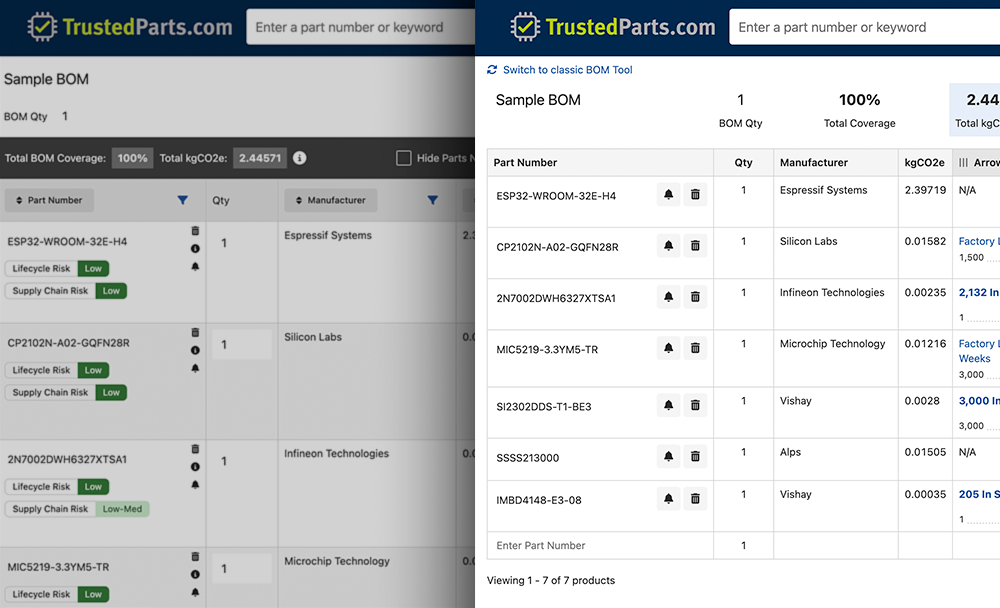
When becoming familiar with the new BOM tool, users may first notice some visual updates. To allow more parts to be visible on the screen, the new BOM tool features a more compact design. Fewer colors and revised formatting enable users to more easily focus on the data displayed in the tool.
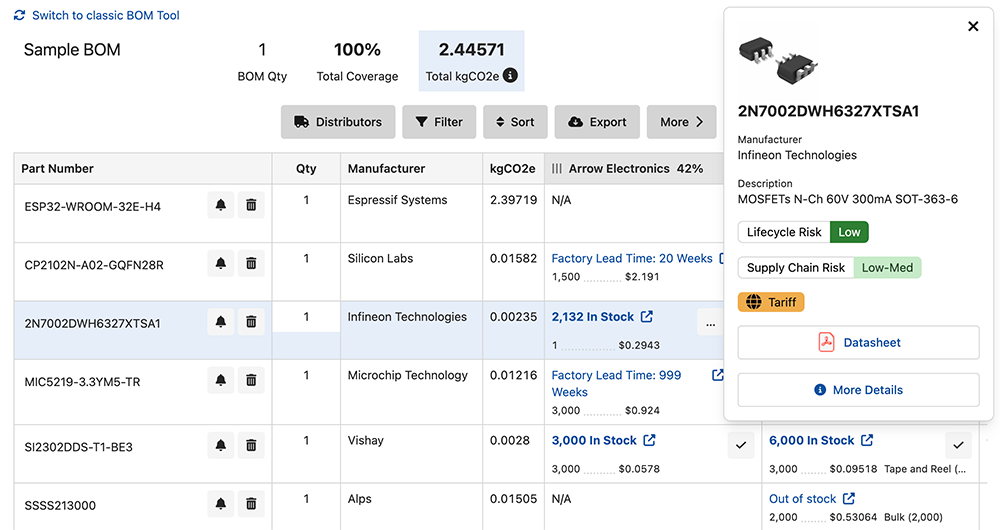
A new part pop-up box displays in the top right corner when clicking on a part row. This concise, yet informative box provides easy access to greater details about each component with just one click.
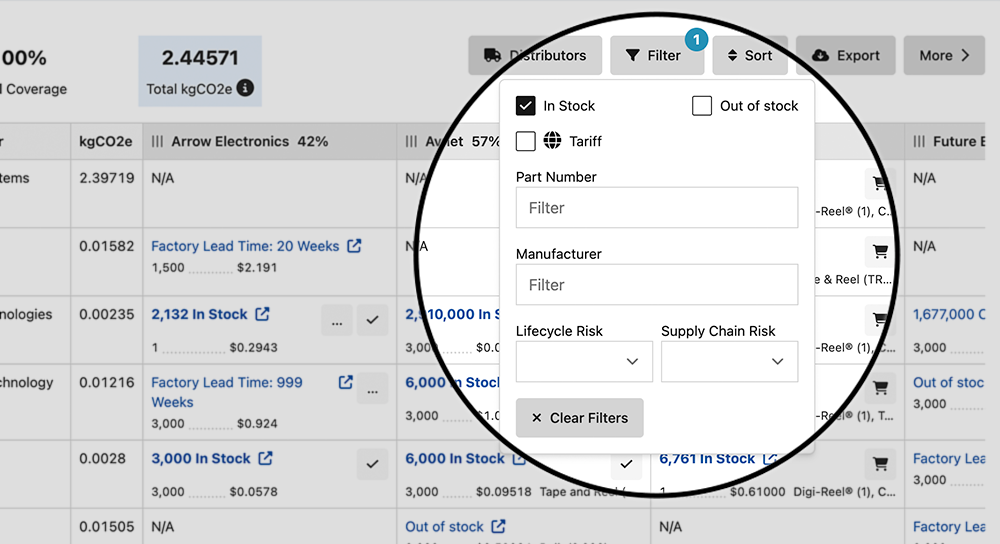
In addition to formatting improvements, we are introducing new filtering functionality and more streamlined sorting as part of the BOM tool redesign. Quickly filter and view parts based on lifecycle risk, supply chain risk, and stock. All sort options (based on part and distributor) are included under one simple button.
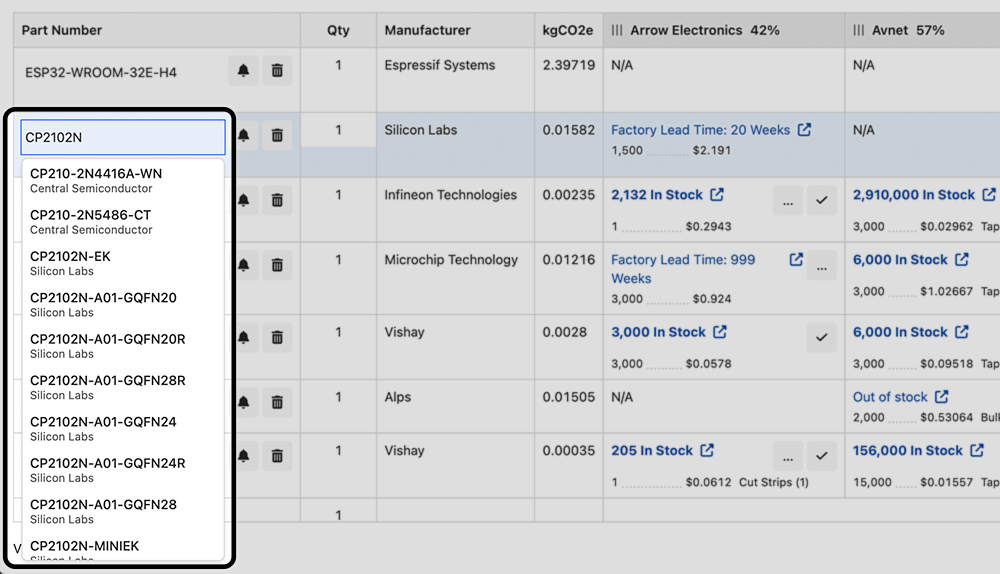
Our improved part auto-suggest now shows manufacturer names with the part numbers, helping you quickly identify the right option when multiple manufacturers produce the same part. If you need to change the manufacturer, you can now do so without removing and re-entering the part. Just select another entry from the auto-suggest.
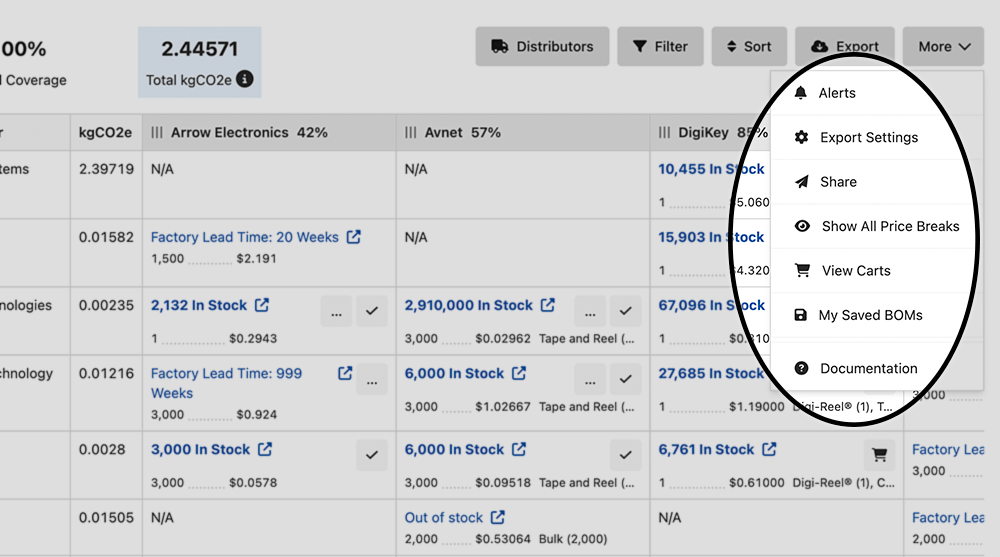
To streamline BOM management, additional BOM functions are easier to find in the comprehensive More menu. This dropdown contains links to the BOM alerts set-up box, export settings, sharing, price break toggle, carts, and links to the saved BOMs and documentation pages.
TrustedParts.com Welcomes Your Feedback
Start using the new BOM tool today—create a new BOM or open a saved BOM and click on the Try our New BOM Tool button at the top of the page. Use the contact form to provide feedback on the new BOM tool.
While users become comfortable with the redesigned BOM tool, both tools will remain on TrustedParts.com. While we encourage users to take advantage of the enhanced new BOM tool, you can switch back to the classic BOM tool using the Switch to classic link on the BOM page.
The classic BOM tool is scheduled to be retired and replaced by the new BOM tool on March 2, 2026. For help using the new BOM tool, review the documentation here. We are confident that this redesigned tool will simplify, enhance, and streamline how you manage your BOMs on TrustedParts.com.